Home › How it works
Why you pay per opening today — and how that changes.
An honest explanation of the technology, without the sales pitch. Once you see why SMS costs money, you can see immediately why this is cheaper.
- No SMS needed
- Works with any motor brand
- Self-managed, no helpdesk
The problem
You used to call your gate. It cost nothing.
A classic GSM gate opener worked on caller ID. You called the unit, it saw your number on the list, refused the call and pulled the relay. No connection, so no charge. An elegant trick — as long as the network played along.
2G was switched off
The old openers depended on the 2G network. When it went away they went dead — for many people at once, regardless of brand.
4G often cannot call
Most affordable 4G modules do not support voice over 4G (VoLTE). They look for a 2G or 3G network to fall back on. If there is none, the call never connects.
So: SMS
What is left is sending a text. That works reliably — but it is billed per message. From then on, every opening appears on your bill.
The solution
Use the internet you already have.
An instruction to open a gate is a few hundred bytes. Over data that costs practically nothing. The whole trick is putting the gateway on the internet instead of on the messaging network.
Self-managed
You manage your gate. No need to call us.
With TapIsla, access to your gate is in your own hands. You add a user or revoke access in the portal, from your phone or laptop. No one to call, no installer to wait for.
- Add users. Enter a name and email; the invitation goes out automatically, in the user's language.
- Revoke access. Disable an account or unlink a phone, and it is over instantly.
- One clear overview. Who has access, whether their phone is linked and whether the account is active.
- Passwords and language. Email a new password or change the language per user.
- Activity log. See who opened the gate and when.
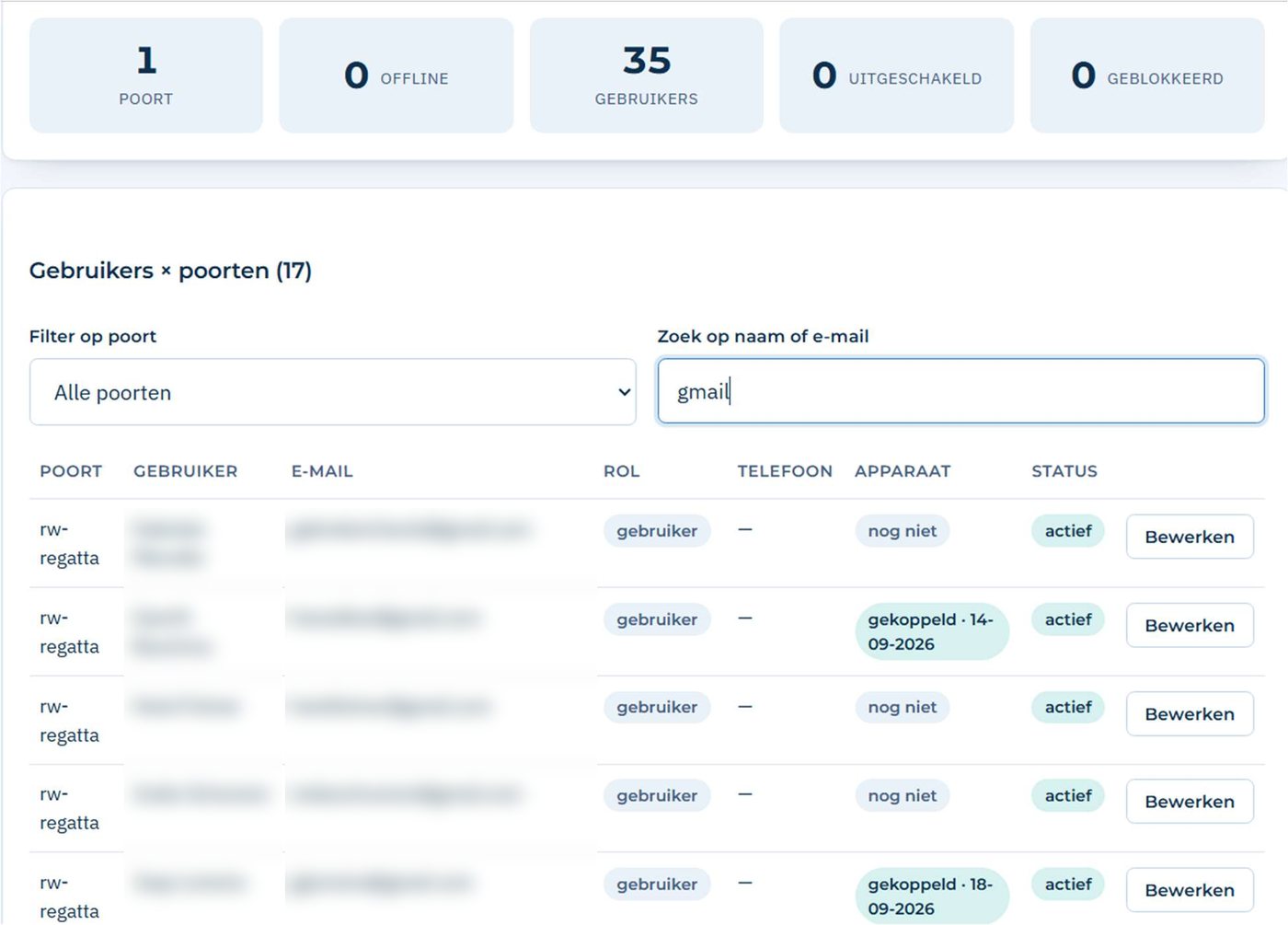
The live portal (shown in Dutch). Names and email addresses are blurred.
You, as administrator
Day-to-day management: who gets in, and who no longer does.
TapIsla, in the background
Servers, database, security, updates and help when you get stuck.
New resident or employee?
Ten seconds of work. No remote to buy, no appointment with an installer.
Someone moved out?
One click and their access is gone. No remote left floating around.
Who opened the gate?
It is in the activity log. Useful for an HOA board or a business.
Connection
The module only needs internet.
WiFi — the standard
If the module is within reach of your WiFi network, everything runs over it. Fast response, and no SIM card or data use at the gate.
No WiFi? MiFi or 4G router
If there is no internet at the gate, we supply a MiFi hotspot or an industrial Teltonika 4G router. The module connects to it over WiFi, and the router handles the mobile data. Usage is minimal.
SMS — optional
SMS is an extra safety net, not a basic part. With a good internet connection you do not need it. Why not?
- No cost per opening. Without SMS nothing is billed per message.
- Reliability lives in the connection. A stable WiFi, or a Teltonika 4G router as a dedicated internet line, is the best safety net.
- Remotes and key switches keep working. Even when the internet drops for a while.
At the gate
What actually gets wired in.
The gateway sits in or beside your gate motor's enclosure. Two wires run to the terminal where a push button would normally go — the dry contact. As far as the motor is concerned, an instruction from TapIsla is indistinguishable from someone pressing that button. That is why it works with almost any brand.
- Nothing gets replaced. Your motor, your remotes and your key switch keep doing exactly what they did.
- Power comes from the motor enclosure. No extra socket, no separate meter.
- Multiple outputs. Front gate and garage can share one gateway.
- ConnectionDry contact (NO/NC), volt-free
- Power12–24 V from the motor enclosure
- ConnectivityWiFi 2.4 GHz · internet via own network, MiFi or Teltonika 4G router · SMS optional
- UsersUp to 20, 50, 100 or 200 depending on your plan; custom above that
- Response timeTypically under a second over WiFi
- LogWho opened it, when, and how
Security
A gate that opens for whoever calls is not a lock.
Only people on the list
Access is tied to an account, not to knowing a phone number. Someone who gets hold of your gate's number cannot use it to get in.
Revoking works immediately
Lost phone, departed employee, tenant moved out: you block the account and it is over at once. No remote still floating around somewhere.
You can see what happens
Every opening is recorded. For an HOA or a business, that is often the argument that settles it.
Still have technical questions?
Ask away. We would rather over-explain up front than leave you with a surprise later.